> ## Documentation Index
> Fetch the complete documentation index at: https://docs.firetone.com.au/llms.txt
> Use this file to discover all available pages before exploring further.
# Settings
> Every row on the settings screen and what it controls.
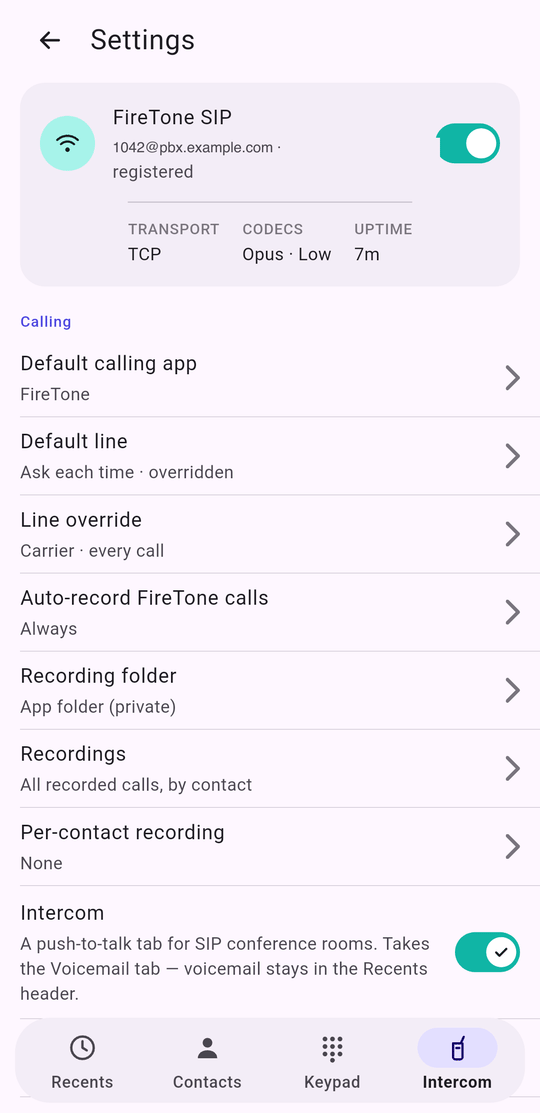 ## The card at the top
Tap it to open [the SIP account](/mobile/connecting); the switch turns the
webphone on and off. Turning it on with no account takes you to setup rather
than failing quietly.
Under it, three figures that answer most of "is it working?": the **transport**
in force, the **codecs** actually enabled (with `· Low` when low-bandwidth is
on), and how long the line has been **up**.
## Calling
| Row | What it does |
| ------------------------------ | -------------------------------------------------------------------------------------------------------------------------------------- |
| **Default calling app** | Android: the system role prompt. iPhone: opens Settings, where iOS 18.2 and newer offer a Calling default. |
| **Default line** | Ask each time, FireTone SIP, or Carrier. |
| **Line override** | Only present while a standing override is set. Opens the same sheet as long-pressing the dial button, including Automatic to clear it. |
| **Auto-record FireTone calls** | Off, Ask once per contact, or Always. |
| **Recording folder** | Android: choose a folder. iPhone: read-only, and says where the files are. |
| **Recordings** | Everything recorded on this phone, by contact. |
| **Per-contact recording** | The exceptions, and who has one. |
| **Voicemail extension** | iPhone only, because iOS exposes no carrier voicemail number. |
| **Intercom** | Turns [the push-to-talk tab](/mobile/intercom) on. It takes the Voicemail slot. |
| **Audio devices** | Speaker and microphone, with a test for each. |
| **Keep FireTone connected** | Android only. Holds the registration open while the app is closed, with a quiet notification. |
The footer under this section is worth reading once: only FireTone calls are
recorded, carrier calls never are, a contact's own setting overrides this, and
recordings stay on the phone.
## App
## The card at the top
Tap it to open [the SIP account](/mobile/connecting); the switch turns the
webphone on and off. Turning it on with no account takes you to setup rather
than failing quietly.
Under it, three figures that answer most of "is it working?": the **transport**
in force, the **codecs** actually enabled (with `· Low` when low-bandwidth is
on), and how long the line has been **up**.
## Calling
| Row | What it does |
| ------------------------------ | -------------------------------------------------------------------------------------------------------------------------------------- |
| **Default calling app** | Android: the system role prompt. iPhone: opens Settings, where iOS 18.2 and newer offer a Calling default. |
| **Default line** | Ask each time, FireTone SIP, or Carrier. |
| **Line override** | Only present while a standing override is set. Opens the same sheet as long-pressing the dial button, including Automatic to clear it. |
| **Auto-record FireTone calls** | Off, Ask once per contact, or Always. |
| **Recording folder** | Android: choose a folder. iPhone: read-only, and says where the files are. |
| **Recordings** | Everything recorded on this phone, by contact. |
| **Per-contact recording** | The exceptions, and who has one. |
| **Voicemail extension** | iPhone only, because iOS exposes no carrier voicemail number. |
| **Intercom** | Turns [the push-to-talk tab](/mobile/intercom) on. It takes the Voicemail slot. |
| **Audio devices** | Speaker and microphone, with a test for each. |
| **Keep FireTone connected** | Android only. Holds the registration open while the app is closed, with a quiet notification. |
The footer under this section is worth reading once: only FireTone calls are
recorded, carrier calls never are, a contact's own setting overrides this, and
recordings stay on the phone.
## App
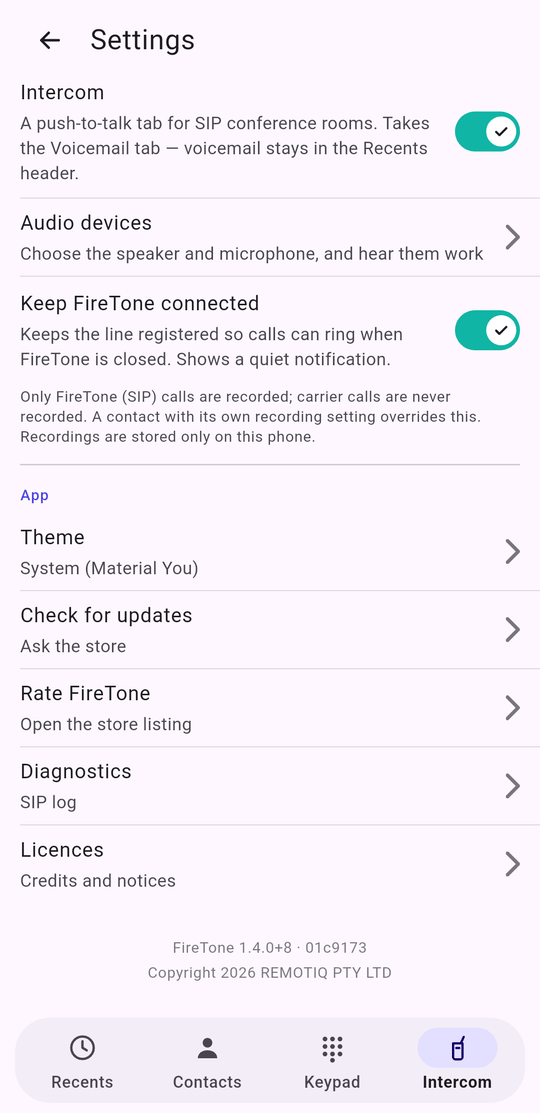 | Row | What it does |
| --------------------- | -------------------------------------------------------------------------- |
| **Theme** | System, Light or Dark. |
| **Check for updates** | Asks the store whether a newer build exists, and offers to take you there. |
| **Rate FireTone** | Opens the store listing. |
| **Diagnostics** | [The SIP log](/mobile/audio-and-diagnostics). |
| **Licences** | Credits and the full open-source notices. |
At the very bottom: the version and the exact build it came from — `FireTone
1.4.0+8 · 01c9173`. Quote both when you report a fault. The commit is what
tells support which code is on your phone, and it is the one thing a version
number alone cannot say.
| Row | What it does |
| --------------------- | -------------------------------------------------------------------------- |
| **Theme** | System, Light or Dark. |
| **Check for updates** | Asks the store whether a newer build exists, and offers to take you there. |
| **Rate FireTone** | Opens the store listing. |
| **Diagnostics** | [The SIP log](/mobile/audio-and-diagnostics). |
| **Licences** | Credits and the full open-source notices. |
At the very bottom: the version and the exact build it came from — `FireTone
1.4.0+8 · 01c9173`. Quote both when you report a fault. The commit is what
tells support which code is on your phone, and it is the one thing a version
number alone cannot say.